Rocky Linux 자동실행 rc.local 설정하기(rc-local.service, WantedBy)
원문출처 : https://yongeekd01.tistory.com/103
Rockylinux rc.local 설정하기(rc-local.service, WantedBy)
rc.local은 리눅스 시스템에서 부팅 시 자동으로 실행되는 스크립트 파일입니다. 이 파일은 시스템이 부팅될 때마다 지정된 명령이나 스크립트를 실행하도록 설정할 수 있으며 초기 부팅 시에 필
yongeekd01.tistory.com
rc.local은 리눅스 시스템에서 부팅 시 자동으로 실행되는 스크립트 파일입니다.
이 파일은 시스템이 부팅될 때마다 지정된 명령이나 스크립트를 실행하도록 설정할 수 있으며 초기 부팅 시에 필요한 설정이나 사용자 정의 작업을 수행하기 위해 자주 사용됩니다.
rc.local 파일의 경로는 주로 /etc/rc.local 이고 루트 권한을 가진 사용자만 수정할 수 있습니다.
이 파일은 시스템의 멀티유저 런레벨에서 실행되는 마지막 스크립트로 실행됩니다.
최신 리눅스 시스템에서는 보안 및 성능 문제로 인해 rc.local의 사용을 권장하지 않는 경우가 있습니다.
대신 systemd를 사용하여 서비스를 관리하거나 cron 작업을 이용하여 작업을 예약하고 실행하는 것이 더 일반적으로 권장하고 있다고 합니다.
rockylinux에서도 기본적으로 rc.local은 동작하지 않도록 되어 있기 때문에 이를 수동으로 enable 해주어야 이 스크립트를 사용할 수 있습니다.
여기서는 rc.local을 설정하고 자동으로 docker container하나를 기동시키는 스크립트를 실행 해보도록 하겠습니다.
1. 설정 확인
>systemctl status rc-local.service

데몬이 active 되어 있지 않은걸 확인할 수 있습니다.
2. 권한 설정
다음 2개 파일의 실행 권한을 할당합니다.
/etc/rc.local
/etc/rc.d/rc.local
>ll /etc/rc.local
lrwxrwxrwx. 1 root root 13 2월 22 01:52 /etc/rc.local -> rc.d/rc.local
> ll /etc/rc.d/rc.local
-rw-r--r--. 1 root root 530 8월 23 10:58 /etc/rc.d/rc.local
>chmod 777 /etc/rc.d/rc.local
>ll /etc/rc.d/rc.local
-rwxrwxrwx. 1 root root 530 8월 23 10:58 /etc/rc.d/rc.local
이제 enable을 시켜보겠습니다.
[root@localhost docker]# systemctl enable rc-local.service
뭐라고 잔뜩 나옵니다.
The unit files have no installation config (WantedBy, RequiredBy, Also, Alias
settings in the [Install] section, and DefaultInstance for template units).
This means they are not meant to be enabled using systemctl.
Possible reasons for having this kind of units are:
1) A unit may be statically enabled by being symlinked from another unit's
.wants/ or .requires/ directory.
2) A unit's purpose may be to act as a helper for some other unit which has
a requirement dependency on it.
3) A unit may be started when needed via activation (socket, path, timer,
D-Bus, udev, scripted systemctl call, ...).
4) In case of template units, the unit is meant to be enabled with some
instance name specified.
WantedBy를 설정해줘야한다는 이야기입니다.
3. WantedBy 설정 추가
/usr/lib/systemd/system/rc-local.service 파일에 다음을 추가해 줍니다.
[Install]
WantedBy=multi-user.target

다시 enaable을 등록하고 확인해 봅니다.
> systemctl enable rc-local.service
systemctl enable rc-local.service
Created symlink /etc/systemd/system/multi-user.target.wants/rc-local.service → /usr/lib/systemd/system/rc-local.service.
> systemctl list-unit-files |grep rc.local
rc-local.service enabled
정상 적으로 등록 되었습니다. 이제 재부팅 후에도 데몬이 실행될 것입니다.
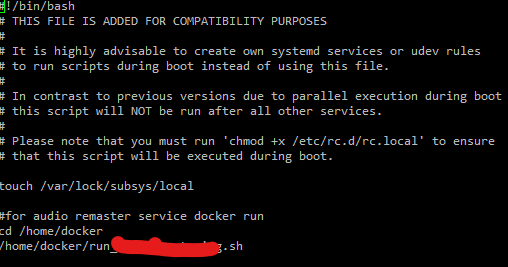
4. 스크립트에 실행할 내용 등록해보기
rc.local 파일에 docker container를 실행시키는 스크립트를 하나 만들어서 추가 하였습니다.
5.재부팅 후 확인
아래 처럼 재부팅후에 스크립트를 통해 잘 실행 되었습니다.
